Drag-and-Drop Request Builder
Build any collection — text, file uploads, images, date pickers. Group into sections. Enforce file format rules per field. No code.
Learn more →
Send structured requests to any number of recipients — clients, speakers, employees, students, vendors, or patients. Set a deadline. GatherMonk chases them automatically. When everything is in, you've approved it all — without a single follow-up email.
Drag and drop any field type into your request — text answers, file uploads, image areas, date pickers, multiple choice. Group into named sections. Set file format and size rules per upload area. No code, no developer.


Configure a reminder sequence once — a friendly nudge on Day 3, a progress check on Day 7, an urgent notice before the deadline. GatherMonk sends every reminder automatically, personalised with the client's name, completion percentage, and outstanding items.
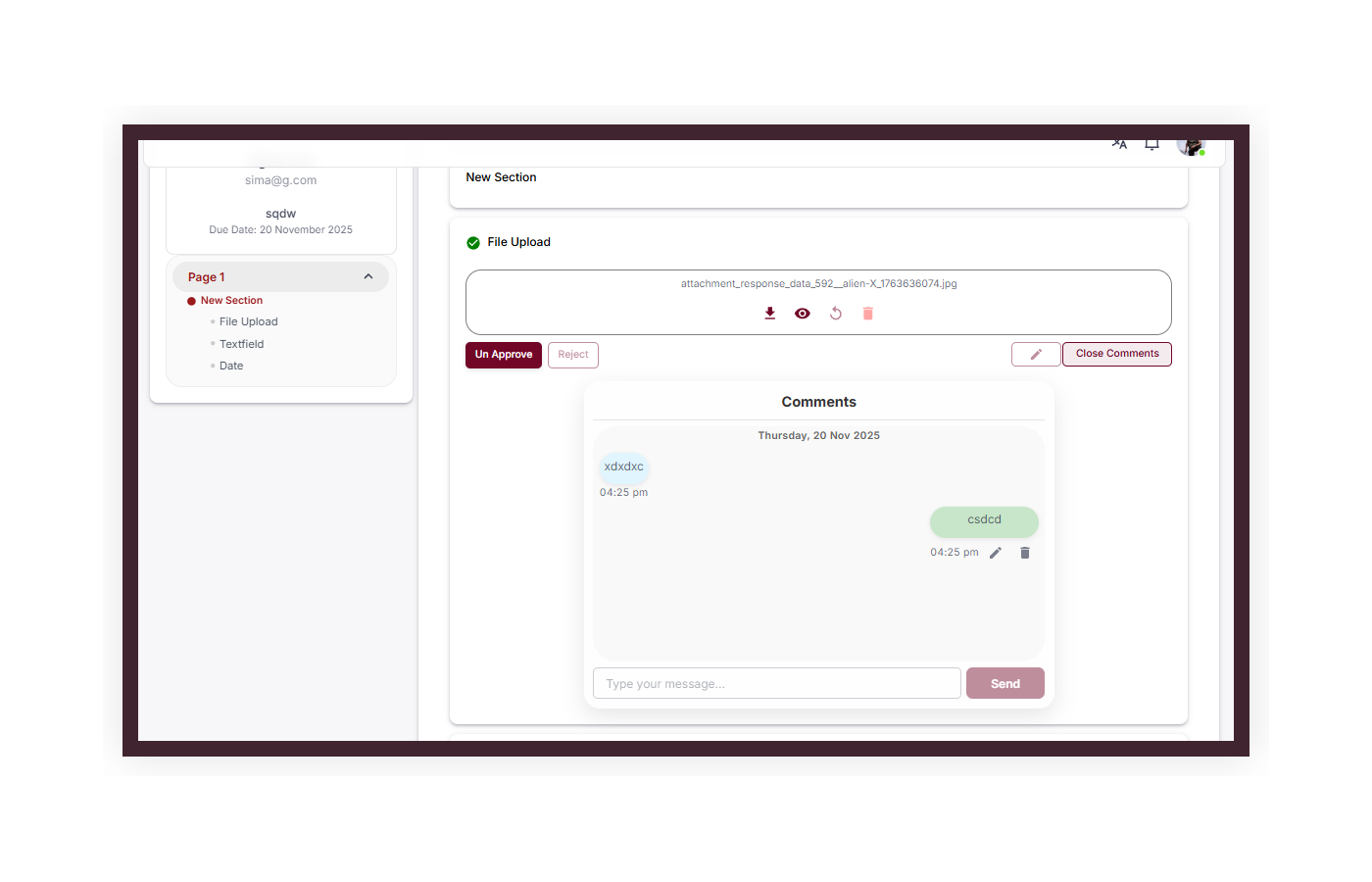
When a client submits, you review each item individually — not the whole submission at once. Approve what's correct. Reject only what needs fixing, with a comment explaining exactly what to change. The client fixes only those items and resubmits. Approved items are locked permanently.


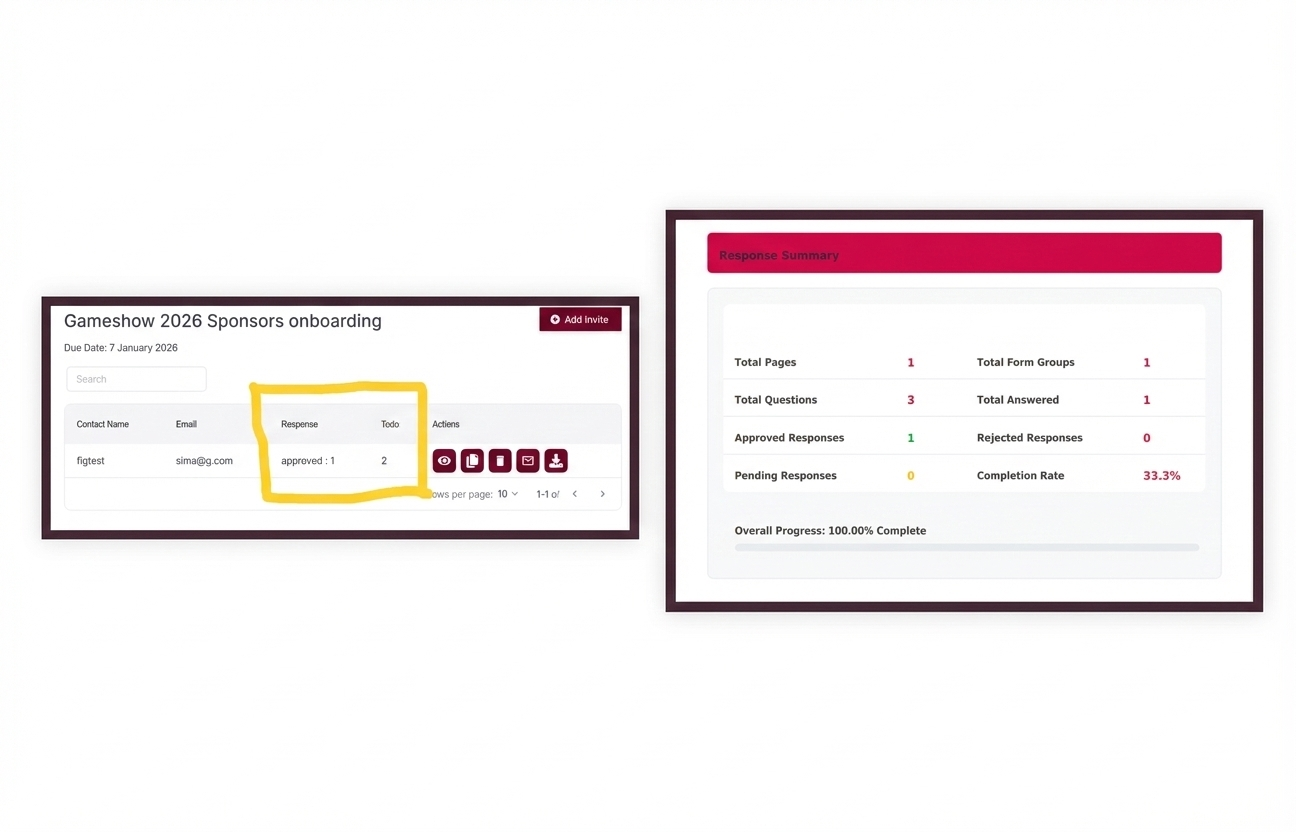
See every recipient's submission status, last activity, responses received, and items outstanding — across all your requests — in one dashboard. No spreadsheet. No inbox hunting. No manual checking.
Every submission has a built-in comment thread. You leave a comment on a field — the submitter sees it, responds, and can resubmit. Back and forth stays attached to the submission, not buried in a separate email. When everything's done, export with one click.

Most teams collecting documents today use email, Google Forms, or both. Here's what changes when you use Requests instead.
| Capability | GatherMonk Requests | |
|---|---|---|
| Follow-up reminders | Manual — written each time | ✓ Automated sequences |
| Know who's submitted | Check inbox + spreadsheet | ✓ Live dashboard |
| File format enforcement | Wrong format arrives anyway | ✓ Rejected at upload |
| Files in one place | Scattered across threads | ✓ Centralised per client |
| Approve / reject submissions | Reply by email | ✓ Field-by-field in dashboard |
| Full audit trail | Email history only | ✓ Every decision timestamped |
| Capability | Google Forms | GatherMonk Requests |
|---|---|---|
| Automated follow-up reminders | ✕ None | ✓ Unlimited steps |
| Track who submitted | Aggregate only | ✓ Per-recipient, real time |
| Approve / reject per field | ✕ Not available | ✓ Field-by-field workflow |
| Personalised per recipient | Same form for everyone | ✓ Unique tracked link |
| File format enforcement | No enforcement | ✓ Rejected at upload |
| PDF + files export | Manual only | ✓ One-click per submission |
Eight core capabilities included on every plan. No extra configuration needed — all of this is ready from day one.
Build any collection — text, file uploads, images, date pickers. Group into sections. Enforce file format rules per field. No code.
Learn more →Unlimited steps. Custom schedule. Personalised per recipient. Smart suppression stops reminders the instant they submit.
Learn more →Approve correct items, reject specific ones with a comment. Clients fix only what's rejected. Approved items locked permanently.
Learn more →Every recipient's status, last activity, and submission progress in one view. Filter by status. No spreadsheet required.
Learn more →Send to 1 client or 500 — each gets their own personalised, tracked submission link. No caps, no per-recipient fees.
Learn more →Save any request — all fields, sections, file rules, and reminders — as a template. Load it next time and send in seconds.
Learn more →Export any request in one click — full PDF submission report plus all uploaded files in a single zip. Everything bundled, every time.
Learn more →All data encrypted at rest and in transit. Hosted on AWS. Fully GDPR compliant. You own your data — export or delete anytime.
Learn more →Real outcomes from teams using GatherMonk Requests to replace email-based document collection.
Set up your first request in under 10 minutes. From there, GatherMonk runs the entire collection workflow automatically.
Drag-and-drop fields. Set file rules. Save as template.
Each person gets a unique personalised link. No login needed.
Personalised follow-ups on your schedule. Stop on submission.
Live dashboard — who's submitted, who's pending, who's at risk.
Approve or reject field by field. Comment. Client resubmits only what's rejected.
One-click export — PDF report + all files zipped.
GatherMonk Requests is used across 25+ industries — anywhere a team needs documents, files, or information from clients, vendors, staff, or partners on a deadline.
Don't see your industry? Browse all 1,000+ templates →
A Request is a structured collection task you send to a specific named person. It defines exactly what you need — documents, answers, files — tracks whether each item has been submitted and approved, and fires automated reminders until complete. Unlike a form, a Request is tied to a named recipient, has a deadline, and supports a full approval and rejection workflow per field. You can see exactly who has and hasn't submitted at any time.
The Request is the collection tool — you send a structured task to a client, they receive a link by email, and submit directly. The Client Portal is a permanent branded workspace where clients log in once and see all their outstanding requests in one organised place. You can use Requests on their own, or add the Client Portal for repeat clients who benefit from one central login. See the Client Portal page for more.
No. Clients receive a unique link by email and click it to open their submission directly — no account creation, no password, no app download. They fill in their answers, upload files, and submit in one session. Zero friction means higher completion rates.
You configure a reminder sequence when setting up the request — for example, a friendly nudge on Day 3, a progress check on Day 7 showing their completion percentage, and an urgent notice before the deadline. GatherMonk sends each one automatically, personalised with the recipient's name, their outstanding items, and the deadline. The moment someone submits, they are removed from all further reminders instantly. There is no limit on how many steps you add.
Yes. A single request can contain any combination of text fields, long-form answers, multiple choice, date pickers, file uploads, and image uploads — with no limit. Each upload area can enforce specific file types (PDF only, JPEG or PNG), maximum file size, and minimum image dimensions. Wrong formats are rejected at upload before they reach your review queue.
Yes. Once you have built a request — including all fields, sections, file constraints, and reminder sequences — save it as a template. Next time, load the template, update the recipient list and due date, and send. GatherMonk also includes a library of pre-built templates for common scenarios: speaker documents, client onboarding, vendor qualification, and more.
Yes. GatherMonk is hosted on Amazon Web Services (AWS). All files and data are encrypted when stored and when transferred. Fully GDPR compliant. You retain full ownership of all submitted data and can export or delete it at any time. A Data Processing Agreement is available on request.
Set up your first automated request in under 10 minutes. No credit card. No commitment.
Need ongoing client relationships? Pair Requests with the Client Portal.
Learn about Client Portals →